
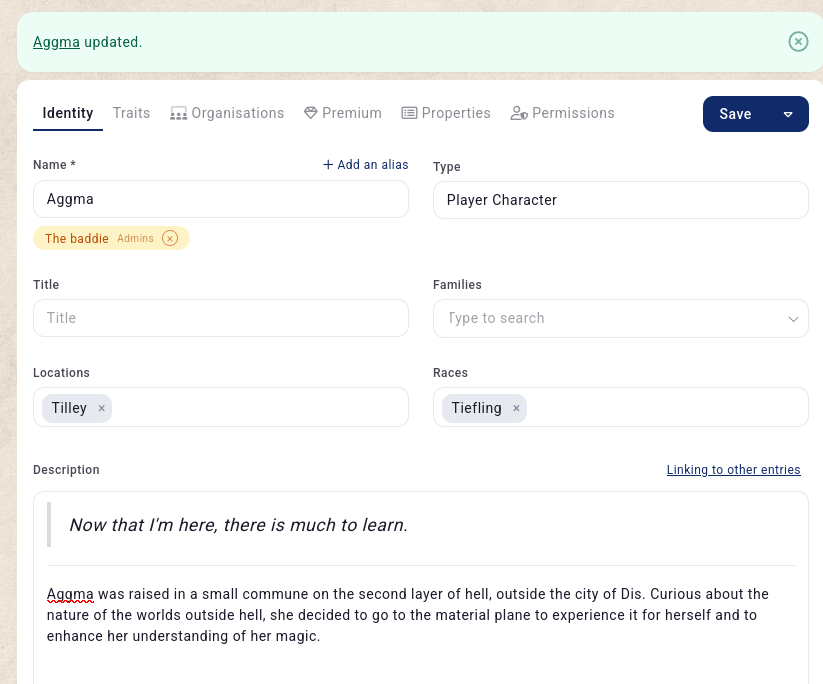
Kanka has always had its own special way of talking about things. Entities, Posts, Attributes, Attribute Templates, Templates, Connections, Assets.. Over time, we’ve heard the same feedback: the terminology can be confusing, especially for new users trying to find their feet. With this update, we’ve rethought the words we use to describe your content, making them feel more natural and intuitive, and sticking with more standard names used in worldbuilding software.
The changes
- Entities are now Entries
- Entry (the description field) is now description (as it was back in 2018)
- Posts are now Articles (OG members will remember them being called Entity Posts a long time ago)
- Attributes are now called Properties
- Attribute Templates are now called Property Kits
- Entity Templates are now called Archtypes
- The Assets subpage of an entity has been renamed Media and it no longer contains aliases.
- The main form for entries now can set and manage aliases directly in the entry’s name field.
- Entity Types and Modules are now simply called Categories
- Connections are now back to being called Relations
- The Entry tab is now called Identity.
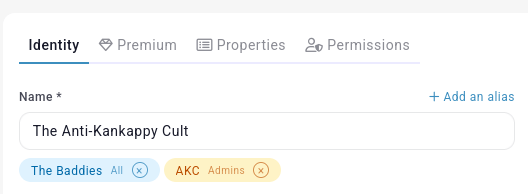
Nothing has been lost. Your data, worlds, and campaigns are all exactly as you left them. We’ve just updated the labels so that the terminology of Kanka gets out of the way and lets you focus on worldbuilding.
CSV Imports (Wyverns & Elementals)
We’ve teased this for a while, and it’s finally ready. Our Wyverns and Elementals can now import content into Kanka using CSV files. This is great when migrating from a massive spreadsheet, another tool, or just have a big list of characters to get into your world fast. This will save a lot of manual work!

Head to your campaign settings -> imports to get started. More info in our docs.
A new text editor
We’ve been working around the clock for months on a brand new in-house text editor built on Tiptap. Our current text editor, Summernote, has served us well for many years, but it gets in the way (to the point of being infuriating) as soon as you want to do anything fancy. Today you’re getting your first look at our new text editor. This is an alpha, so expect rough edges, but we wanted to get it into your hands easly so we can shape it together.
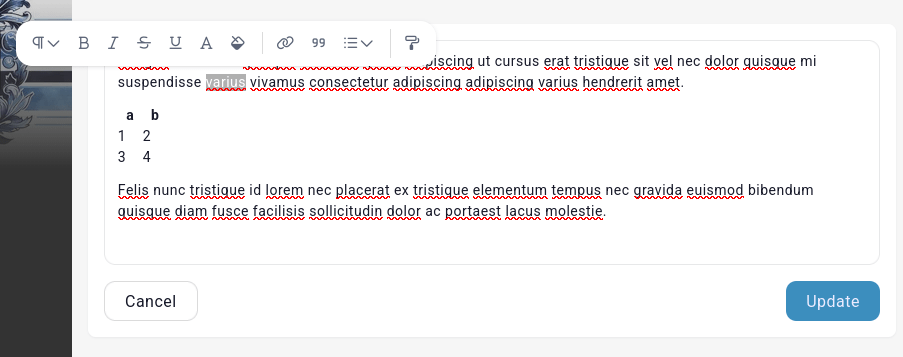
The goal is a richer, more modern writing experience that doesn’t get in your way and feels at home in a worldbuilding tool. We’ll be iterating on this heavily over the coming months.
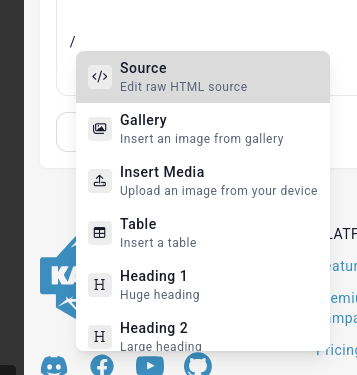
The editor uses modern “bubble” menus that only show formating options related to the currently selected content, as well as the /slash command feature now common in every writing software.
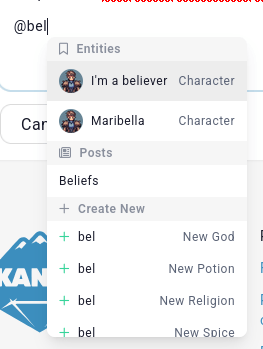
We’ve spend a lot of time re-thinking mentions. Gone are “advanced mentions” and their nonsense. Mentions are now visual in their bubble menus. @ mentions also search for properties and articles of the current entry.
To switch to this experimental editor, go to your appearance settings and select the Experimental 2026 text editor option.
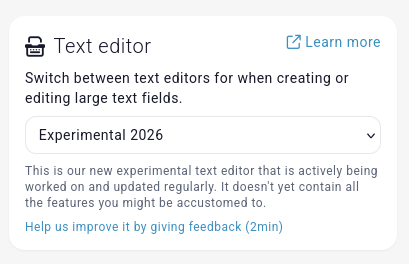
Selecting this option will also show a link to a survey so you can send your feedback. We will be iterating heavily on this new editor all throughout the year.
Not included in this alpha
As a tiny team, we cant match every feature offered in Summernote in such a short time. Here are some of the things missing from this alpha that we will work on.
- English only. Translations will come later
- Tables are still very much a work in progress (and where most of our efforts have been spent the past several months)
- Not everything has a keyboard shortcut
- No screen reader support
- And probably lots of other things that I’m blanking on. Have I mentioned that I’ve been working on this non-stop for months at this point?
Open campaigns
Looking for players to join your game? We’ve re-done the whole “open campaign” workflow. You can now provide a lot more information (timezones, player targets, play styles), and players apply with a lot more information. You can find out about this new system in our docs or head to your campaign’s Settings > Join Requests page and let it guide you through the setup.
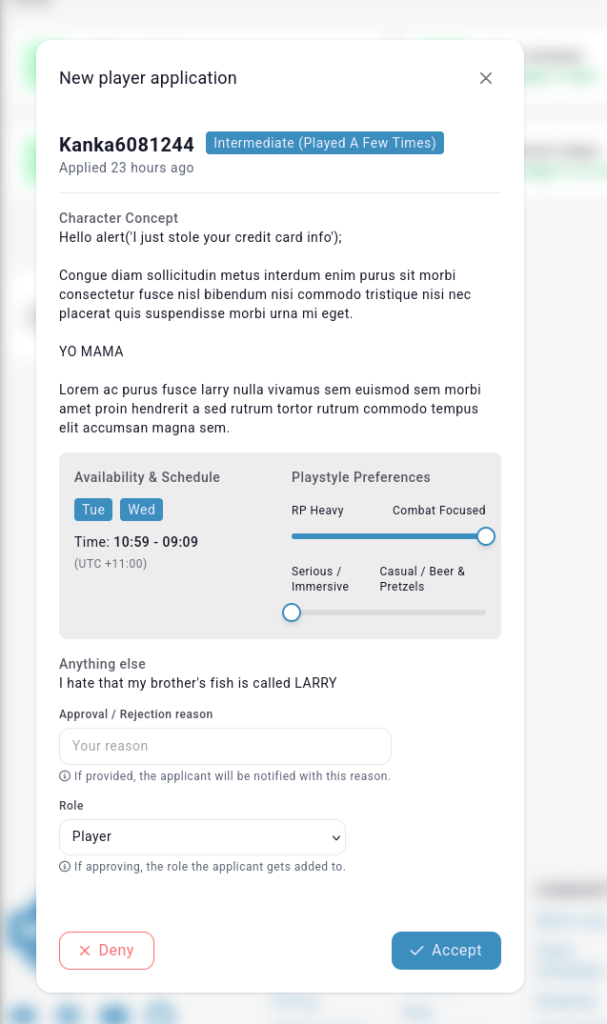
Elementals get the option to “sponsor” one open campaign at a time, showing it first when a user searches for open campaigns.

Easy sharing
We’ve added some new “sharing” workflows to make it quicker and easier to share your worlds and entries with people (whether that’s a player, a ready, or someone you’re trying to recruit to your cult worldbuilding project).
For example, directly from the dashboard, you can now bring up a “share campaign” option.
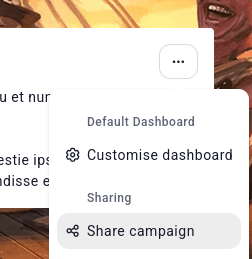
If the campaign is private, it will prompt you to make it public.
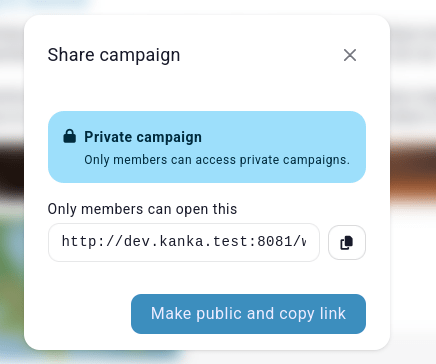
We’re adding a similar share option directly on entities.
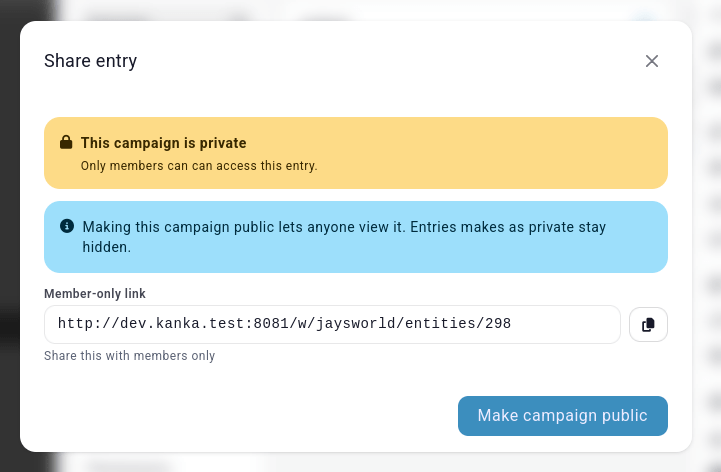
If the campaign is private, again, you can quickly change that. However, if then the public role can’t view the entity, a few more quick helpers are shown!
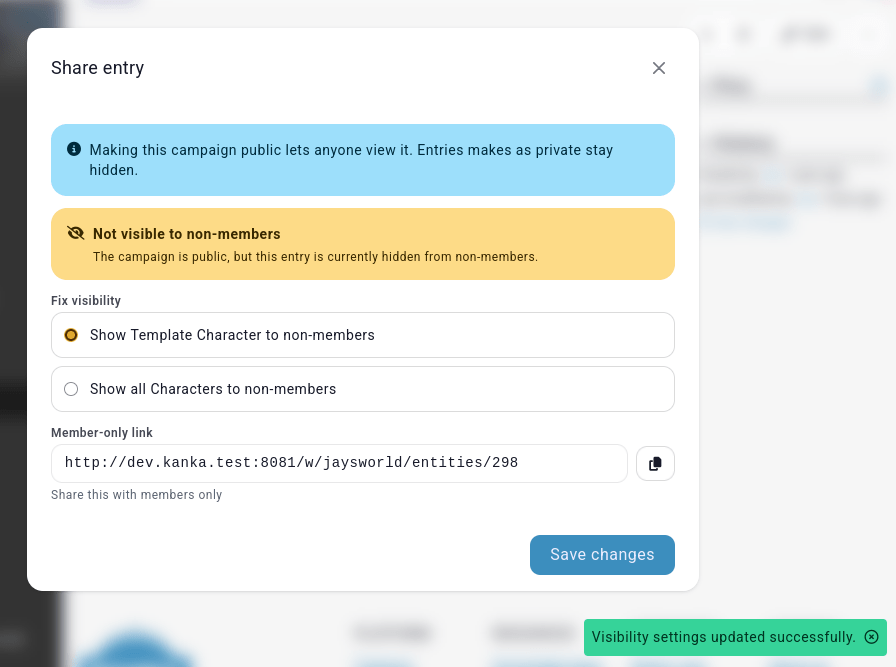
You can quickly decide if non-members should be allowed to see just this entry, or if you want all your entries of the same category to be visible to all.
Better empty previews
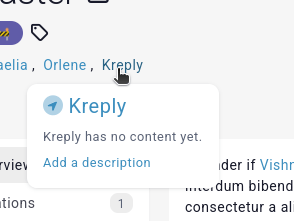
Ever hovered an entry name and the preview was empty and you thought to yourself “well that was a waste of time?”. We do to, so we’re doing something about it. If the entry has no image, the entry’s category icon is shown. So at least you now know what kind of entry you’re even looking at. We’ve also added a text to confirm that the entry has no content/description yet. And if you’re lucky (can edit the entry), a link to go edit just the entry’s description shows up. Efficient!
Dynamic creation
When filling out a form, especially when starting on a new world, you might not have a family, race, location, or whatever to fill out. You could click on the “+new” icon to the right of the field, but that’s just so many extra steps, and you’re in a hurry to get your world up and running. So now you can just type in the fields and add new content on the fly. Incredibly efficient!
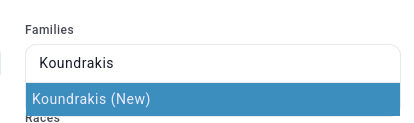
PS: You can now name new entities with just numbers, something which wasn’t possible previously.
Under the hood
We’ve replaced the Select2 library, which powered all our dynamic dropdowns since 2018, with a newer more modern (and lighter) tom-select library. This means we can finally get rid of jQuery from Kanka, which makes me incredibly happy (jQuery still gets loaded on pages requiring the old summernote text editor).
UI changes
We are working on some big changes to the UI for later this year, and know that change can be scary. We’re doing some small tweaks with this update so that the more radical updates coming later hurt less.
Primary colour
The primary colour of buttons and links is now the same colour as Kanka’s deep blue logo, so that we have a consistent colour between our marketing website and the app.
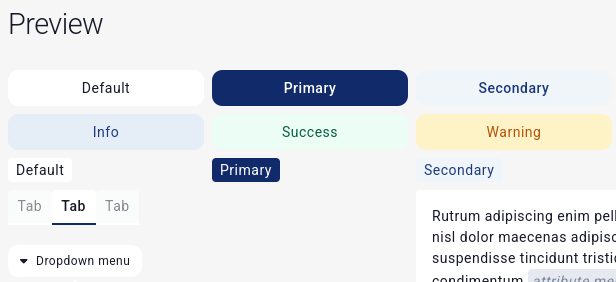
We’ve updated the success, info, warning and error “alerts” to have a more 2020s feel. Links in alerts are now also underlined to clearly mark them as links, which will work better with various themes.

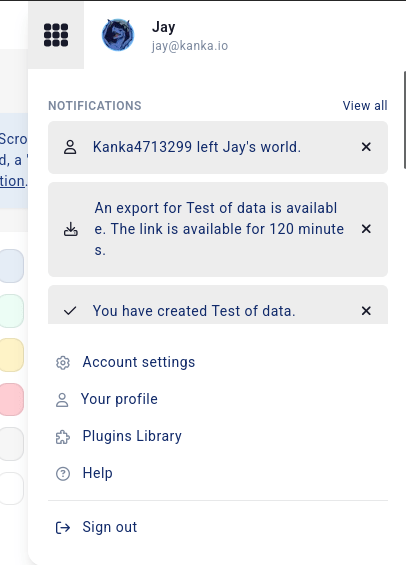
We’ve tweaked the profile popup. Now the account links and logout is always visible, while announcements and notifications are now scrollable. We’ve also removed the plugins stats seeing as they were hardly clicked on. We now also show the account’s email directly here, so that all of you still using multiple accounts (instead of permission testing) can directly see if you’re logged in the wrong account.
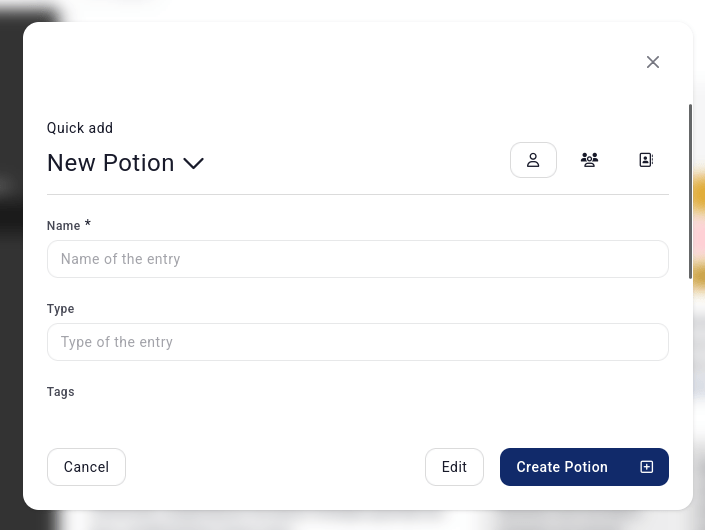
We’ve also fixed every dialog/modal we could find so that the header and footer is always visible, with the content being scrollable. This should result in a better experience for all screen sizes and layouts.
What are these big changes we’re working on UX wise? Let’s just say that the sidebar has its days numbered 🔫. We’ll share progress in the Discord once we have things to show.
Bug fixes
Fixed multiple bugs with campaign imports crashing due to the new “locations” architecture introduced in 3.8.
A fix/improvement, the “starter kit” of entities created when you register a new account have been improved to be more generic and include more feature showcasing. We now also flag these internally as to be able to exclude them from our stats.
Fixed multiple issues with the APIs where submitting bad data triggered a crash instead of an error that could be reported back to the user.
The quick-creator interface has been fixed to work better on small screens.
The sidebar now properly stays closed on mobile.
Fixed issues with the “copy options” when copying an entry.
Exporting an entry to markdown no longer crashes when the code finds an attribute mention of a hidden or deleted entry.
Bulk-editing map markers is fixed (again).
Fixed multiple issues with dashboards crashing on slow/instable internet connections.
We’ve removed a metric tonne of old JavaScript librairies from the code. These were no longer being used (or loaded) for several years, so this cleanup won’t result in faster page loads, but it means we get less irrelevant emails about potential security issues in our javascript files.
Bulk printing works again.
That’s it for 3.9! With this, we basically finish our quarterly objectives and shift our focus on roadmap features. Expect some popular (and less popular ones) to appear with the next update.
As always, a huge thank you to our amazing subscribers for making these frequent updates possible. Come say hi on our Discord we share early previews of what’s coming next.
Also, we recently showcased our first two campaigns over here! And we have a worldbuilding challenge going on over here if you need to get your creative juices flowing.
 Kanka Blog
Leave a comment