
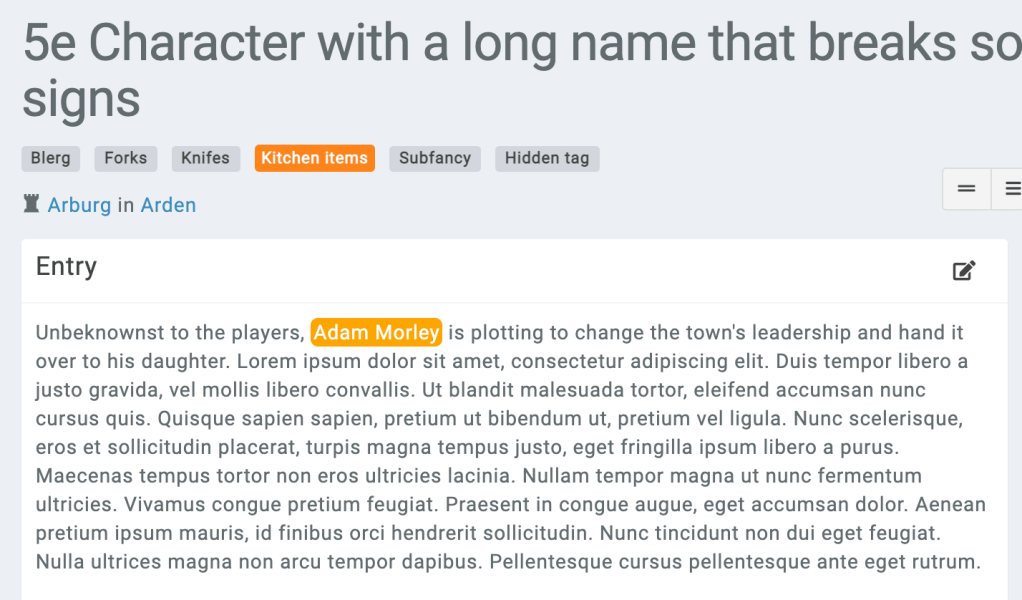
In many cases, you might want to style mentions (when an entity is mentioned in text) based on that entity’s tags. This is possible with a premium campaign and some custom CSS.
All mentions include a special data-entity-tags property that will include the entity’s tags. This is present in both tag-{id} and the tag’s name stripped of special characters.
Let’s pretend for a minute that you have a tag called “STUB“. You use this tag to mark entities that need filling out in the future. Now, you want entities mentioned with that tag to pop out. First off, create a mention of the entity that possesses that tag. Next, use your browser’s inspector console to look at the way the mention is generated. It might look a little like this.
<a href="https://kanka.io/xyz" class="entity-mention" data-entity-tags="id-561 stub" data-toggle="tooltip-ajax" data-id="117" data-url="https://kanka.io/xyz/tooltip" data-original-title="" title="">Adam Morley</a>The important part for us is data-entity-tags="id-561 stub". With this information, we can create a CSS rule in our premium campaign’s CSS field. Campaign theming can be accessed under World > Theming.
.entity-mention[data-entity-tags~="stub"] {
    background-color: orange;
    color: white;
    padding: 2px;
    border-radius: 5px;
}
Save the changes and refresh the entity that is mentioning our example. It should now look something like this.

Et voilà! If you have any questions, join us over on our Discord and ask away in the #css-help channel where our CSS Wizards will help you. We also have more tutorials on our blog!
 Kanka Blog